
Blox Fruit Script 2026 Guideline – Latest Working No Key Scripts & Hubs
Many Blox Fruit players spend hours repeating the same quests, farming enemies, and searching for rare items, making progression feel slow and repetitive. After every major update, older scripts often stop working, leaving players confused about which options are still compatible.
This guide explains the latest Blox Fruit Script 2026, its features, setup process, and updates in simple language so players can save time and enjoy a smoother gameplay experience.
What Is Blox Fruit Script
Blox Fruit Script is a custom Lua script that adds automation and gameplay enhancements to Blox Fruits is one of the most popular Roblox games, but reaching higher levels, completing quests, and collecting rare items can take a significant amount of time. A Blox Fruit Script helps automate repetitive tasks like Auto Farm, Auto Quest, leveling, and combat, allowing players to progress more efficiently while enjoying a smoother gameplay experience. This guide covers the latest Blox Fruit Script 2026, including its features, setup process, supported Download Delta Executors, and everything you need to know to stay updated with the newest game version.
Latest Working Blox Fruit Script
The latest Blox Fruit Scripts are updated regularly to remain compatible with new Roblox patches and game content. Choosing an actively maintained script improves stability, reduces errors, and ensures access to newly added features.
Min Gaming Hub Script
loadstring(game:HttpGet("https://raw.githubusercontent.com/LuaCrack/Min/refs/heads/main/MinXt2Eng"))()New RedZ Hub Script
local Settings = {
JoinTeam = "Pirates";
Translator = true;
}
getgenv().BETA_VERSION = true
loadstring(game:HttpGet("https://raw.githubusercontent.com/tlredz/Scripts/refs/heads/main/main.luau"))(Settings)BF New Version
loadstring(game:HttpGetAsync("https://raw.githubusercontent.com/indexeduu/BF-NewVer/refs/heads/main/V3New.lua"))()Banana Cat Hub
loadstring(game:HttpGet("https://raw.githubusercontent.com/Nghia11n/Banana-Hub/main/bananahub.lua"))()Azure WScript
loadstring(game:HttpGet("https://api.luarmor.net/files/v3/loaders/3b2169cf53bc6104dabe8e19562e5cc2.lua"))()HoHo Hub Script
loadstring(game:HttpGet("https://raw.githubusercontent.com/acsu123/HOHO_H/main/Loading_UI"))()Neva Hub Script
loadstring(game:HttpGet("https://raw.githubusercontent.com/VEZ2/NEVAHUB/main/2"))()Raito Hub Script
loadstring(game:HttpGet("https://raw.githubusercontent.com/Efe0626/RaitoHub/main/Script"))()Redz Hub Script
loadstring(game:HttpGet("https://raw.githubusercontent.com/realredz/BloxFruits/refs/heads/main/Source.lua"))()Speed Hub X
loadstring(game:HttpGet("https://raw.githubusercontent.com/AhmadV99/Speed-Hub-X/main/Speed%20Hub%20X.lua"))()KNCRYPT HUB V3
loadstring(game:HttpGet("https://raw.githubusercontent.com/3345-catsus/Kncrypt/refs/heads/main/sources/BloxFruit.lua"))()Auto Farm Script
loadstring(game:HttpGet("https://raw.githubusercontent.com/Cazzanos/The-basement/main/Basement%20hub", true))()Shadow Hub Script
loadstring(game:HttpGet("https://raw.githubusercontent.com/xPeachy/Shadow-Hub/main/Blox-Fruits"))()Cat Core Hub Script
loadstring(game:HttpGet("https://raw.githubusercontent.com/KISOOUF/Cat-Core/main/Blox%20Fruits"))()Amanize Hub Script
loadstring(game:HttpGet("https://raw.githubusercontent.com/Kiriko-Protection/Scripts/main/Blox-Fruit-Bypass"))()Gravity Hub
loadstring(game:HttpGet("https://raw.githubusercontent.com/Dev-GravityHub/BloxFruit/refs/heads/main/Main.lua"))()Blue X Hub
loadstring(game:HttpGet("https://raw.githubusercontent.com/Dev-BlueX/BlueX-Hub/refs/heads/main/Main.lua"))()Neru Hub
loadstring(game:HttpGet("https://raw.githubusercontent.com/NeroHubClub/AutoMythicFruitFinder/refs/heads/main/NeroHubFruitFinder"))()Leaf Hub
repeat wait() until game:IsLoaded() and game.Players.LocalPlayer
loadstring(game:HttpGet("https://leaf-zeta.onrender.com/api/script"))()Maru Hub
getgenv().Team = "Marines"
loadstring(game:HttpGet("https://raw.githubusercontent.com/LuaCrack/KimP/refs/heads/main/MaruHub"))()Astral Hub
loadstring(game:HttpGet("https://raw.githubusercontent.com/Vcsk/AstralHub/main/Main.lua", true))()Solara Script
loadstring(game:HttpGet("https://raw.githubusercontent.com/UserDevEthical/Loadstring/main/CokkaHub.lua"))()Night Hub
loadstring(game:HttpGet("https://raw.githubusercontent.com/NIGHTHUBONTOP/Main/main/NightHub.lua"))()Quantum Onyx Hub
loadstring(game:HttpGet("https://raw.githubusercontent.com/flazhy/QuantumOnyx/refs/heads/main/QuantumOnyx.lua"))()Than Hub (jjSploit Compatible)
loadstring(game:HttpGet("https://raw.githubusercontent.com/thantzy/thanhub/refs/heads/main/thanv1"))()Bacon Hub
loadstring(game:HttpGet("https://raw.githubusercontent.com/BaconScriptHub/BaconHub/main/New-BaconHub.lua.txt"))()Teddy Hub
loadstring(game:HttpGet("https://raw.githubusercontent.com/Teddyseetink/Haidepzai/refs/heads/main/TeddyHub.lua"))()Vxeze Hub
loadstring(game:HttpGet("https://raw.githubusercontent.com/Dex-Bear/Vxezehub/refs/heads/main/VxezeHubMain"))()Void Hub
loadstring(game:HttpGet("https://raw.githubusercontent.com/VoidDeveloper67/Void-Hub/refs/heads/main/VoidHub.lua", true))()Flow Hub
loadstring(game:HttpGet("https://api.luarmor.net/files/v4/loaders/5946add9ab91f1e04cb005346a8b1968.lua"))()NightMystic Hub
repeat wait() until game:IsLoaded() and game.Players.LocalPlayer
getgenv().team = "Marines"
loadstring(game:HttpGet("https://raw.githubusercontent.com/Dev-NightMystic/Bloxfruits/refs/heads/main/Script.lua"))()KITE Hub
loadstring(game:HttpGet("https://raw.githubusercontent.com/GoblinKun009/Script/refs/heads/main/KiteLoader", true))()Xynapse Hub
loadstring(game:HttpGet("https://pastebin.com/raw/uECLqG3j", true))()TurboLite Hub
loadstring(game:HttpGet("https://raw.githubusercontent.com/TurboLite/Script/refs/heads/main/MainV2.lua"))()Solix Hub
loadstring(game:HttpGet("https://raw.githubusercontent.com/meobeo8/a/a/a"))()Midnight Hub
repeat wait() until game:IsLoaded() and game.Players.LocalPlayer
getgenv().Team = "Pirates"
loadstring(game:HttpGet("https://raw.githubusercontent.com/Ohofo2279/Midnight/refs/heads/main/MidnightX-BloxFruits.lua"))()Monster Hub
loadstring(game:HttpGet("https://raw.githubusercontent.com/giahuy2511-coder/MonsterHub/refs/heads/main/MonsterHubEN"))()Novus Hub
loadstring(game:HttpGet("https://api.luarmor.net/files/v3/loaders/14f9e9054b916dc305c310f9549a5272.lua"))()Relz Hub
loadstring(game:HttpGet("https://relzhub.farrelghibran.com/loader.lua"))()Ather Hub
loadstring(game:HttpGet("https://api.luarmor.net/files/v4/loaders/2529a5f9dfddd5523ca4e22f21cceffa.lua"))()Annie Hub
loadstring(game:HttpGet("https://raw.githubusercontent.com/Anniecreate86/BloxFruits/refs/heads/main/BetaHub-BF"))()Dragon Hub
repeat wait() until game:IsLoaded() and game.Players.LocalPlayer
getgenv().team = "Pirates"
loadstring(game:HttpGet("https://raw.githubusercontent.com/dragonhubdev/dragonwitheveryone/refs/heads/main/Main-BF.lua"))()MeoX Hub
loadstring(game:HttpGet("https://raw.githubusercontent.com/VanHoangIOS/MeoXHub/refs/heads/main/Main.lua"))()MatsuneHub
getgenv().Setting = {}
loadstring(game:HttpGet("https://luacrack.site/raw.php/MatsuneHubSuppor/raw/Gamemod2.lua"))()Zynex Hub
loadstring(game:HttpGet("https://raw.githubusercontent.com/Hirokai-Script-make/Zynexhubbloxfruit/refs/heads/main/ZynexHub-BloxFruit-redz.lua"))()King Rua Hub
repeat task.wait() until game:IsLoaded() and game.Players.LocalPlayer
loadstring(game:HttpGet("https://raw.githubusercontent.com/shinichi-dz/phucshinyeuem/refs/heads/main/KingRuaHub.lua"))()Xeter Hub
loadstring(game:HttpGet("https://raw.githubusercontent.com/TlDinhKhoi/Xeter/refs/heads/main/Main.lua"))()Apple Hub
loadstring(game:HttpGet("https://raw.githubusercontent.com/SuperIkka/Main/refs/heads/main/AppleHub", true))()Cookie Hub
loadstring(game:HttpGet("https://raw.githubusercontent.com/Jadelly261/BloxFruits/refs/heads/main/Cookie", true))()Zee Hub
loadstring(game:HttpGet("https://link.trwxz.com/LS-Zee-Hub-VIP"))()Zyn Hub
loadstring(game:HttpGet("https://raw.githubusercontent.com/GoblinKun009/Script/refs/heads/main/ZynHub", true))()NazuX Hub
script_key = "PUT YOUR KEY HERE";
loadstring(game:HttpGet("https://raw.githubusercontent.com/NguyenAnhKhoaX/Anhkhoa2279/refs/heads/main/BloxFruits.lua"))()Vector Hub
loadstring(game:HttpGet("https://raw.githubusercontent.com/AAwful/Vector_Hub/0/v2"))()VEX Hub
loadstring(game:HttpGet("https://raw.githubusercontent.com/yoursvexyyy/VEX/refs/heads/main/bloxfruits%20cash%20farm%20premium"))()Foggy Hub
loadstring(game:HttpGet("https://raw.githubusercontent.com/FOGOTY/foggy-bloxfruit/refs/heads/main/script"))()DatThg Hub
loadstring(game:HttpGet("https://raw.githubusercontent.com/LuaCrack/DatThg/refs/heads/main/DatThgV2"))()Aurora Hub
loadstring(game:HttpGet("https://raw.githubusercontent.com/Jadelly261/BloxFruits/main/Aurora", true))()Alchemy Hub
loadstring(game:HttpGet("https://scripts.alchemyhub.xyz"))()NatHub
loadstring(game:HttpGet("https://raw.githubusercontent.com/ArdyBotzz/NatHub/refs/heads/master/bf.lua"))()RoHub
_G.settings = {
autoLoadConfig = false,
joinTeam = "Pirates"
}
loadstring(game:HttpGet("https://raw.githubusercontent.com/RO-HUB-CODEX/RO-HUB/refs/heads/main/bloxfruits.lua"))()Quartyz Hub
getgenv().Mode = "OneClick"
loadstring(game:HttpGet("https://raw.githubusercontent.com/xQuartyx/QuartyzScript/main/Loader.lua"))()Zinner Hub
getgenv().Team = "Pirates"
loadstring(game:HttpGet("https://raw.githubusercontent.com/HoangNguyenk8/Scripts/refs/heads/main/Loader.lua"))()Mukuro Hub
loadstring(game:HttpGet("https://auth.quartyz.com/scripts/Loader.lua"))()TheBillDevHub
loadstring(game:HttpGet("https://raw.githubusercontent.com/selciawashere/screepts/refs/heads/main/BFKEYSYS",true))()Forge Hub
loadstring(game:HttpGet("https://raw.githubusercontent.com/Skzuppy/forge-hub/main/loader.lua"))()Ronix Hub
loadstring(game:HttpGet("https://api.luarmor.net/files/v3/loaders/b5f968ca22436160479678e830766cc4.lua"))()Lumin Hub
loadstring(game:HttpGet("http://lumin-hub.lol/BloxFruits.lua"))()Ziner Hub
loadstring(game:HttpGet("https://raw.githubusercontent.com/Tienvn123tkvn/Test/main/ZINERHUB.lua"))()Onyx F
loadstring(game:HttpGet("https://raw.githubusercontent.com/zenzon23/new-bf/refs/heads/main/onyx%20f"))()Lap Hub
loadstring(game:HttpGet("https://raw.githubusercontent.com/Jadelly261/BloxFruits/refs/heads/main/LapHub", true))()Master Hub
loadstring(game:HttpGet("https://raw.githubusercontent.com/onepicesenpai/onepicesenpai/main/onichanokaka"))()Strawberry Hub
loadstring(game:HttpGet("https://raw.githubusercontent.com/CheemsNhuChiAl/Sotringhuhu/main/StrawberryHubBeta1.35"))()Rise Hub
loadstring(game:HttpGet("https://raw.githubusercontent.com/TrashLua/BloxFruits/main/FreeScripts.lua"))()Experience Hub
loadstring(game:HttpGet("https://raw.githubusercontent.com/Memories0912/Experience-Script/main/Gen2Beta.lua"))()Skibidi Loader
loadstring(game:HttpGet("https://raw.githubusercontent.com/SkibidiSupremacy/Loader.xyz/main/Beta.Loader"))()Kaitun Script
loadstring(game:HttpGet("https://raw.githubusercontent.com/memaybeohub/NewPage/main/Kaitun.lua"))()AnDepZai Hub
loadstring(game:HttpGet("https://raw.githubusercontent.com/AnDepZaiHub/AnDepZaiHubBeta/main/AnDepZaiHubBeta.lua"))()Cokka Hub
loadstring(game:HttpGet("https://raw.githubusercontent.com/UserDevEthical/Loadstring/main/CokkaHub.lua"))()Xero Hub
getgenv().Team = "Marines"
getgenv().Fix_Lag = true
getgenv().Auto_Execute = false
getgenv().Clear_Settings = false
loadstring(game:HttpGet("https://raw.githubusercontent.com/verudous/Xero-Hub/main/main.lua"))()Infinite Hub
loadstring(game:HttpGet("https://raw.githubusercontent.com/Baokhanh208/Infinite/main/filesrc.lua"))()WindyX Bounty Loader
loadstring(game:HttpGet("https://raw.githubusercontent.com/ItzWindy01/WindyXBypass/main/BountyLoadder.lua"))()Spectrum Hub
loadstring(game:HttpGet("https://raw.githubusercontent.com/xZPUHigh/Project-Spectrum/main/SpectrumX.lua"))()Dominance Hub
loadstring(game:HttpGet("https://raw.githubusercontent.com/Script-Blox/Script/main/Dominance"))()Chest Farm Script
loadstring(game:HttpGet("https://raw.githubusercontent.com/Unknownproootest/Bloxfruit-speedboat/main/ChestFarm"))()MTriet Hub
loadstring(game:HttpGet("https://raw.githubusercontent.com/Minhtriettt/Free-Script/main/MTriet-Hub.lua"))()OMG Hub
loadstring(game:HttpGet("https://raw.githubusercontent.com/Omgshit/Scripts/main/MainLoader.lua"))()How to Execute Blox Fruit Script
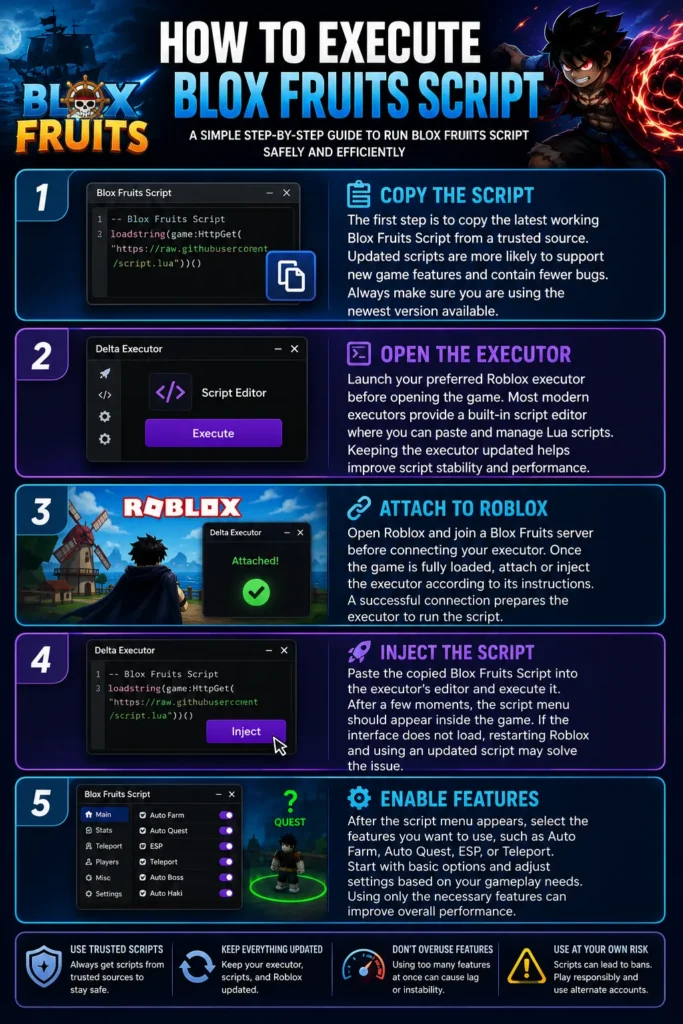
Running a Blox Fruit Script is a simple process when using a compatible Roblox executor. Following the correct steps helps avoid common errors and ensures the script loads properly. Always use the latest version of your executor for the best compatibility with recent Roblox updates.
Copy the Script
The first step is to copy the latest working Blox Fruit Script from a trusted source. Updated scripts are more likely to support new game features and contain fewer bugs. Always make sure you are using the newest version available.
Open the Executor
Launch your preferred Roblox executor before opening the game. Most modern executors provide a built-in script editor where you can paste and manage Lua scripts. Keeping the executor updated helps improve script stability and performance.
Attach to Roblox
Open Roblox and join a Blox Fruits server before connecting your executor. Once the game is fully loaded, attach or inject the executor according to its instructions. A successful connection prepares the executor to run the script.
Inject the Script
Paste the copied Blox Fruit Script into the executor’s editor and execute it. After a few moments, the script menu should appear inside the game. If the interface does not load, restarting Roblox and using an updated script may solve the issue.
Enable Features
After the script menu appears, select the features you want to use, such as Auto Farm, Auto Quest, ESP, or Teleport. Start with basic options and adjust settings based on your gameplay needs. Using only the necessary features can improve overall performance.
Installation Guide of Blox Fruit Script
Most of the players are playing games on mobile and PC. Here is the complete Installation Guide for Mobile and PC.
Mobile Installation Guide
Many players prefer using Blox Fruit Script on mobile because it offers greater flexibility and convenience. Modern mobile executors support most script features while maintaining a simple touchscreen interface. Following the correct setup process helps ensure smooth execution.
Android Setup
Download a compatible Roblox executor for Android and install the latest version on your device. Open Roblox, launch the executor, paste the script, and execute it after joining the game. Keeping both Roblox and the executor updated improves compatibility.
iOS Compatibility
Script support on iOS depends on the executor and current system limitations. Some executors provide partial compatibility, while others may require additional setup. Always check whether your chosen executor officially supports the latest iOS version.
Emulator Guide
If you prefer playing on a computer using Android apps, an emulator can provide an alternative experience. Install a supported emulator, set up Roblox, and use a compatible mobile executor to run the script. This method combines mobile features with desktop controls.
PC Installation Guide
Using Blox Fruit Script on PC generally provides better performance, smoother controls, and improved stability. Desktop executors often receive updates quickly and support advanced script features. Following a proper setup process helps reduce execution errors.
Windows Setup
Install a trusted Roblox executor that supports the latest game version on Windows. Launch Roblox, attach the executor, paste the script, and execute it after entering the game. Keeping your software updated ensures better compatibility.
Common Errors
Some users may experience issues such as failed injection, script loading errors, or unexpected crashes. These problems are often caused by outdated executors or unsupported script versions. Updating your software usually resolves most common issues.
Performance Tips
Closing unnecessary background applications can improve script performance and reduce lag. Lowering Roblox graphics settings may also provide smoother gameplay during long farming sessions. Regularly updating your executor helps maintain stable execution.
Best Blox Fruit Script Hubs
Script hubs combine multiple features into one easy-to-use interface, allowing players to automate farming, combat, teleportation, and more from a single menu. The best Blox Fruit Script Hubs are regularly updated to remain compatible with the latest game version and provide a smooth user experience.
Redz Hub
Redz Hub is one of the most popular Blox Fruits Script hubs, offering a wide collection of automation features for beginners and experienced players. It includes Auto Farm, Teleport, Boss Farming, and ESP tools in a clean interface. Frequent updates help maintain compatibility with the latest Blox Fruits releases.
HoHo Hub
HoHo Hub provides advanced farming tools and gameplay enhancements designed to reduce grinding time. Players can automate quests, level progression, and resource collection with just a few clicks. Its user-friendly menu makes it a preferred choice for many Roblox players.
W-Azure Hub
W-Azure Hub offers a balanced combination of farming, combat, and teleport features for efficient gameplay. It receives regular improvements to support new Blox Fruits updates and bug fixes. The lightweight design also helps maintain stable performance during long gaming sessions.
Banana Cat Hub
Banana Cat Hub is known for its simple interface and reliable automation tools. It includes popular features like Auto Farm, Fast Attack, ESP, and Quest Automation to improve leveling speed. The hub is regularly updated to support current game content.
Quantum Hub
Quantum Hub provides a modern collection of automation tools focused on farming efficiency and combat performance. Players can quickly enable different features through an organized interface without complicated settings. It is suitable for both casual and advanced users.
Speed Hub X
Speed Hub X is designed for players who want fast leveling and efficient resource farming. The hub includes multiple automation features, teleport options, and combat enhancements that reduce repetitive gameplay. Regular updates help ensure compatibility with new Blox Fruits patches.
Ronix Hub
Ronix Hub combines essential farming features with several advanced gameplay utilities in one script. It offers smooth performance, customizable settings, and an easy-to-navigate interface. Players often use it for long farming sessions due to its stability.
Zen Hub
Zen Hub includes a variety of automation tools that help players complete quests, defeat bosses, and collect valuable rewards more efficiently. The script focuses on reliability and performance while supporting the latest Blox Fruits content.
Blue X Hub
Blue X Hub offers powerful farming, teleportation, and combat features that simplify progression throughout the game. Its organized menu allows players to quickly activate the functions they need. Frequent updates keep the hub working with new Roblox changes.
Neva Hub
Neva Hub focuses on providing stable automation with a lightweight interface suitable for most devices. It offers essential features such as Auto Farm, Teleport, and ESP while maintaining smooth performance during extended gameplay sessions.
Raito Hub
Raito Hub is designed for players looking for consistent farming performance and simple controls. It provides useful automation features without overwhelming users with unnecessary options. The hub remains a popular choice due to its ease of use.
Mukuro Hub
Mukuro Hub includes advanced automation features for quests, bosses, Devil Fruits, and resource farming. Players can customize different settings to match their preferred gameplay style. Continuous development helps improve compatibility and overall performance.
Blox Fruit Script Requirements
Before using a Blox Fruit Script, make sure your device and software meet the necessary requirements. Using compatible tools improves execution speed, reduces errors, and provides a smoother gameplay experience.
Roblox Version
Always install the latest Roblox version before running any script. Updated game files improve compatibility with recently released executors and reduce the likelihood of execution problems.
Executor Requirements
A compatible Roblox executor is required to run Lua scripts successfully. Choosing an actively maintained executor improves script stability, supports newer game updates, and minimizes execution errors.
Internet Connection
A stable internet connection helps prevent disconnections during long farming sessions. Reliable connectivity also improves synchronization between Roblox, the executor, and script features.
Device Compatibility
Most modern Blox Fruit Script support Windows PCs and Android devices through compatible executors. Before installing, verify that your device meets the executor’s minimum system requirements for the best performance.
Supported Roblox Executors
A Roblox executor is required to run any Blox Fruit Script successfully. Choosing a compatible and regularly updated executor helps improve stability, reduce execution errors, and ensure access to the latest script features.
| Executor | Description | Best For |
| Delta Executor | One of the most widely used Roblox executors for running Blox Fruit script on supported devices. It offers a clean interface, reliable execution, and regular updates to maintain compatibility with new Roblox releases. | Stable performance and frequent updates |
| Fluxus | Provides stable script execution with support for many popular Roblox games. Its simple interface and consistent updates make it a reliable choice. | Reliable script execution across multiple games |
| Codex | Designed to execute modern Roblox scripts while maintaining compatibility with frequently updated games. Includes performance improvements and supports many Lua scripts. | Modern script compatibility and optimized performance |
| Arceus X | A popular mobile Roblox executor for Android devices. It features a touchscreen-friendly interface and receives frequent updates for improved compatibility. | Android/mobile users |
| KRNL Alternatives | With KRNL becoming less available, many users have shifted to alternative executors that offer similar functionality and better compatibility with current Roblox updates. | Users seeking KRNL replacements |
| Hydrogen | A lightweight executor focused on smooth script execution and stable performance. It supports various Roblox experiences with an easy-to-use interface. | Lightweight and beginner-friendly usage |
| Vega X | Offers a straightforward execution process with support for many popular Roblox scripts. Regular improvements help ensure compatibility with the latest Roblox updates. | Simple interface and dependable execution |
Best Tips for Faster Progress
Using automation features correctly can improve your progress while making farming more efficient. Combining different script functions often produces better results than relying on a single feature.
Use Auto Quest with Auto Farm
Running Auto Quest together with Auto Farm allows your character to complete missions continuously while defeating enemies. This combination provides faster experience gains and higher Beli earnings.
Upgrade Stats Regularly
Distributing your stat points correctly increases your character’s overall damage and survivability. Balanced upgrades also improve farming speed and make boss battles easier to complete.
Farm According to Your Level
Always target enemies that match your current level to maximize experience gains. Fighting stronger enemies too early may slow your overall progression instead of improving it.
Keep Your Script Updated
Always replace outdated scripts with the newest version after major Roblox updates. Updated scripts usually contain bug fixes, performance improvements, and support for the latest game content.
Troubleshooting
Even the latest Blox Fruit Script can occasionally stop working due to Roblox updates or executor changes. Most issues can be resolved by updating your tools, using the latest script version, or checking your device settings. Below are the most common problems and their solutions.
Script Not Working
If your Blox Fruit Script does not execute, first verify that you are using the latest version. Outdated scripts often stop working after major Roblox updates. Replacing the old script with an updated one usually fixes the issue.
Auto Farm Stops
Auto Farm may stop because your character dies, a quest ends, or the game receives an update. Restarting the feature or rejoining the server often restores normal operation. Using updated script settings can also improve stability.
Executor Crashes
Frequent executor crashes are commonly caused by outdated software or device limitations. Installing the latest version and closing unnecessary background applications can improve performance. Restarting both Roblox and the executor may also resolve temporary errors.
Injection Failed
An injection failure usually means the executor could not connect to Roblox successfully. Make sure Roblox is fully loaded before injecting the script. Updating your executor often fixes compatibility problems after new game patches.
Frequently Asked Questions (FAQs)
Is Blox Fruit Script Free?
Many Blox Fruit Scripts are available free of charge and include essential automation features. Some developers may also offer premium versions with additional tools and customization options. Always download scripts from trusted sources to ensure you receive the latest updates.
Does It Work on Mobile?
Yes, many modern Blox Fruits Scripts support Android devices through compatible Roblox executors. Mobile versions often include the same core features available on PC while using a touchscreen-friendly interface. Compatibility depends on the executor being used.
Does It Require a Key?
Not always. Some Blox Fruits Scripts include a key verification process, while others are completely keyless. No Key Scripts are popular because they allow players to start using features immediately without completing additional verification steps.
Can I Get Banned?
Using third-party scripts may violate Roblox’s Terms of Use and could lead to account actions. While many players use scripts, there is always a level of risk involved. Understanding these risks is important before deciding to use any script.
How Often Is It Updated?
Most actively maintained Blox Fruits Scripts receive updates shortly after major Roblox or Blox Fruits patches. Frequent updates help maintain compatibility, improve performance, and fix reported issues. Using the latest version is recommended for the best experience.
Which Script Hub Is Fastest?
The fastest script hub depends on your preferred features, executor compatibility, and device performance. Well-maintained hubs usually provide smoother automation, better optimization, and more reliable updates. Choosing a regularly updated hub often results in the best overall experience.
How Do I Fix Errors?
Most script-related errors can be resolved by updating your executor, using the newest script version, and restarting Roblox. Checking your internet connection and verifying executor compatibility can also help eliminate common execution issues. If problems continue, waiting for a script update may be necessary after major Roblox changes.
Conclusion
Blox Fruit Script 2026 offers a wide range of automation features that help players complete quests, farm resources, and explore the game more efficiently. With support for Auto Farm, Teleport, ESP, Boss Farming, and many other tools, it simplifies repetitive gameplay while improving overall progression. Keeping your script and executor updated ensures better compatibility, smoother performance, and access to the latest features introduced in every Blox Fruits update.