
Roblox Error Codes (2026): Complete Guide of Causes & Fixes
If you’ve run into a Roblox error codes, don’t worry—most issues can be fixed with a few simple steps. In this guide, we’ll explain common Roblox error codes like 267, 279, 277, 264, 610, 529, 524, 403, 769, and 103, why they happen, and how to solve them. Whether the problem is caused by your internet connection, Roblox servers, or your device, you’ll find easy solutions that work. The fixes are suitable for Windows, Mac, Android, iPhone, iPad, and Xbox users, helping you get back to playing as quickly as possible.
What Are Roblox Error Codes?
Roblox error codes are simply messages that let you know why something isn’t working as expected. You might see them when you can’t join a game, log in to your account, or connect to Roblox servers. While these errors can be frustrating, each one usually points to a specific issue, such as a network problem, server downtime, account restrictions, or a device setting. Once you know what the error code means, it’s much easier to apply the right fix and get back to playing without wasting time on unnecessary troubleshooting.
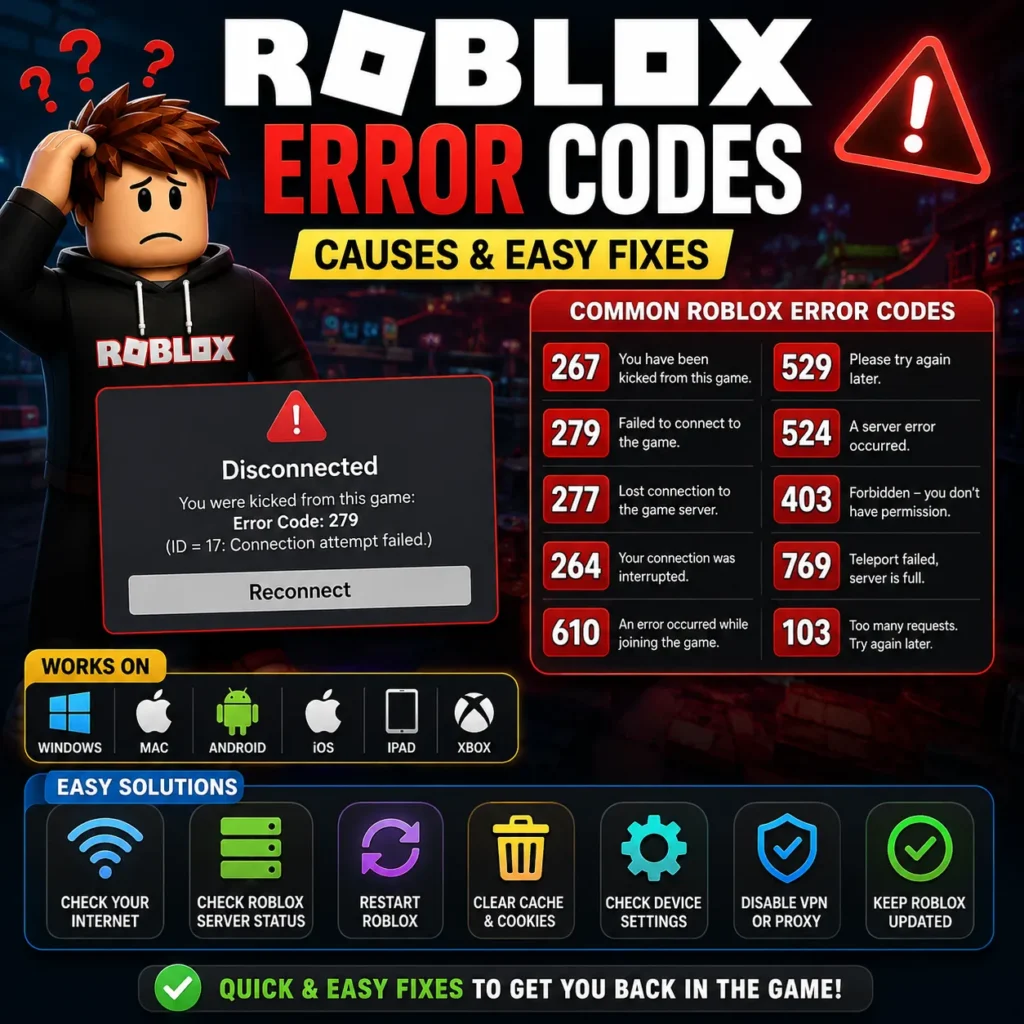
Why Do Roblox Error Codes Appear?
Roblox error codes usually appear when something interrupts the connection between your device and Roblox. Sometimes the problem is on your end, like a slow internet connection, outdated app, or incorrect settings. Other times, the issue is caused by Roblox servers being down, scheduled maintenance, or game-specific access restrictions set by developers. Understanding what triggers these errors helps you find the right solution faster and avoid spending time on fixes that won’t solve the problem.
Roblox Error Codes at a Glance
Roblox uses different error codes to identify specific issues, including connection problems, server outages, login failures, account restrictions, and game-related errors. The table below provides a quick overview of the most common Roblox error codes, their causes, and what they mean, helping you identify the problem and find the right solution faster.
| Common Cause | How It Affects Roblox | Quick Fix |
| Internet Connection Issues | Weak Wi-Fi, high ping, or packet loss can cause disconnects, failed game joins, and connection errors. | Use a stable internet connection, restart your router, or switch to a faster network. |
| Roblox Server Downtime | Server maintenance or outages can prevent logins and game access for all players. | Check Roblox server status and wait until services are restored. |
| Outdated Roblox Version | An old version of Roblox may cause compatibility issues, bugs, or update-related errors. | Install the latest Roblox update from the official app store or website. |
| Corrupted Cache Files | Damaged temporary files can lead to crashes, loading problems, or unexpected errors. | Clear the Roblox cache or reinstall the application. |
| Firewall or Antivirus Blocking Roblox | Security software may block Roblox from connecting to its servers. | Allow Roblox through your firewall or antivirus settings. |
| VPN or Proxy Enabled | VPNs and proxies can increase latency or interfere with Roblox server connections. | Disable the VPN or proxy and use a direct internet connection. |
| Device Compatibility Issues | Older devices or unsupported operating systems may not run Roblox properly. | Update your operating system and use a supported device. |
| Account Restrictions | Privacy settings, parental controls, or game permissions may block access to certain experiences. | Review your Roblox account settings and ensure you have the required permissions. |
Types of Roblox Errors
Most Roblox error codes fall into a few common categories, such as network problems, account restrictions, device compatibility issues, or Roblox server outages. Identifying the type of error helps you choose the right solution and fix the problem more quickly.
Connection Errors
Connection errors happen when your device has trouble communicating with Roblox servers. They’re often caused by a weak internet connection, Wi-Fi interruptions, VPNs, or network settings, leading to failed game joins, disconnects, or long loading times.
Permission Errors
Permission errors occur when Roblox doesn’t allow access to a game or feature because your account doesn’t have the required permissions. This can happen due to privacy settings, private servers, parental controls, or game-specific restrictions, and updating your settings or getting the proper access usually fixes the issue.
Server Errors
Server errors happen when Roblox’s servers are down, overloaded, or undergoing maintenance, preventing players from joining games or using online features. Since these issues are on Roblox’s side, the best solution is usually to wait until the service is restored.
Login Errors
Login errors occur when Roblox can’t verify your account, often because of incorrect login details, authentication issues, or temporary server problems. Checking your credentials, resetting your password if needed, or waiting for Roblox to restore its login services usually resolves the issue.
Device & Compatibility Errors
Device compatibility errors happen when your device or operating system doesn’t fully support the latest version of Roblox. Updating your device, installing the newest Roblox app, and keeping your operating system up to date can usually prevent or fix these issues.
Roblox Error Code 267
What Is Roblox Error Code 267?
Roblox Error Code 267 appears when you’re kicked out of a game by the server instead of experiencing a game crash. It is commonly caused by game-specific restrictions, anti-cheat systems, or permission settings rather than a problem with Roblox itself. This Roblox error codes can occur on Windows, Mac, Android, iPhone, iPad, and Xbox, and understanding its cause makes it much easier to apply the right fix.Why Does Error Code 267 Occur?
Common Situations Where Error 267 Appears
You may see Roblox Error Code 267 right after joining a game, during gameplay, or when trying to reconnect to a server. It is most common in games with strict rules, private access, or advanced anti-exploit systems that automatically remove players who don’t meet the game’s requirements.
How to Fix Roblox Error Code 267
To fix Roblox Error Code 267, start by checking your internet connection, updating Roblox, and making sure your account has permission to join the game. If the error only happens in one specific experience, the issue is likely caused by that game’s rules or server settings rather than Roblox itself.
Roblox Error Code 279
What Is Roblox Error Code 279?
Roblox Error Code 279 occurs when your device can’t establish a stable connection with Roblox servers, preventing you from joining a game. It is usually caused by network issues such as a slow internet connection, firewall restrictions, or server communication problems, and can affect players on PC, mobile devices, and Xbox.
Main Causes of Error Code 279
Roblox Error Code 279 is usually caused by an unstable internet connection, high network latency, firewall or antivirus restrictions, VPNs, or temporary Roblox server problems. Before trying advanced fixes, check whether the issue is with your network or Roblox’s servers, as this will help you choose the right solution faster.
How to Fix Roblox Error Code 279
To fix Roblox Error Code 279, make sure you have a sHtable internet connection, update Roblox to the latest version, restart your router, and check that your firewall or antivirus isn’t blocking the game. If many players are experiencing the same issue, the problem is likely with Roblox servers, and you’ll need to wait until the service is restored.
Roblox Error Code 277
What Is Roblox Error Code 277?
Roblox Error Code 277 appears when you lose connection to a game after successfully joining it. It is commonly caused by an unstable internet connection or temporary communication issues between your device and Roblox servers, resulting in unexpected disconnections during gameplay.
Why Does Roblox Error 277 Happen?
Roblox Error Code 277 is often caused by packet loss, unstable Wi-Fi, temporary Roblox server issues, or network interruptions. If the error happens frequently, it usually points to a network stability problem or outdated Roblox files that should be checked and updated.
How to Resolve Roblox Error Code 277
To fix Roblox Error Code 277, use a stable internet connection, keep Roblox updated, and avoid network interruptions while playing. If the issue continues, check Roblox server status and inspect your router, ISP, or device for connection problems.
Roblox Error Code 264
What Is Roblox Error Code 264?
Roblox Error Code 264 appears when the same Roblox account is being used on more than one device at the same time. To prevent session conflicts and protect your account, Roblox automatically ends one of the active sessions and displays this error.
Why Does Error Code 264 Occur?
Roblox Error Code 264 is usually caused by your account being logged in on multiple devices at the same time. In some cases, incomplete logouts or temporary session sync issues can also trigger the error, so signing out of other devices often resolves the problem.
Solutions for Roblox Error Code 264
To fix Roblox Error Code 264, make sure your account is signed in on only one device at a time. Sign out of any unused sessions, review your account security, and change your password if you suspect unauthorized access to prevent future login conflicts.
Roblox Error Code 610
What Is Roblox Error Code 610?
Roblox Error Code 610 is an access-related error that can stop you from joining certain games or online sessions. It is usually caused by temporary Roblox server issues, account synchronization problems, or restrictions on private servers, and can affect players on all supported devices.
Causes of Error Code 610
Roblox Error Code 610 is commonly caused by temporary server issues, private server restrictions, account sync problems, or failed communication with Roblox services. If the error only occurs in one game, the issue is likely game-specific; otherwise, it may be a temporary Roblox platform problem.
Fixes for Roblox Error Code 610
To fix Roblox Error Code 610, update Roblox, check the Roblox server status, verify your account permissions, and try joining the game again after a few minutes. If the error appears across multiple games, it may be related to your account or a temporary issue with Roblox services.
Roblox Error Code 529
What Is Roblox Error Code 529?
Roblox Error Code 529 is a server-related error that occurs when Roblox is unable to process your request because its servers are overloaded, under maintenance, or temporarily unavailable. It can appear while logging in, joining a game, or loading online features on Windows, Mac, Android, iPhone, iPad, and Xbox, and often affects many players at the same time.
Common Reasons Behind Error 529
Roblox Error Code 529 is usually caused by Roblox server outages, scheduled maintenance, high traffic, or temporary backend issues. Although a weak internet connection or an outdated Roblox app can sometimes contribute, this error is most often caused by problems on Roblox’s side, so checking the server status is the best first step.
How to Fix Roblox Error Code 529
To fix Roblox Error Code 529, make sure you’re using the latest version of Roblox, check that your internet connection is stable, and verify whether Roblox servers are experiencing an outage. Since this is usually a server-side issue, the error often disappears automatically once Roblox restores its services.
Roblox Error Code 524
What Is Roblox Error Code 524?
Roblox Error Code 524 appears when you try to join a private or VIP server without the required permission or invitation. Unlike connection errors, this code means Roblox successfully reached the server, but your account isn’t allowed to access that specific game or server.
Why Does Roblox Show Error 524?
Roblox Error Code 524 is usually caused by trying to join a private server without an invitation or the required permissions. It can also occur because of account privacy settings, recent server permission changes, or temporary synchronization issues between your account and the server.
How to Solve Roblox Error Code 524
To fix Roblox Error Code 524, make sure you’ve been invited to the private server, check that your account privacy settings allow server invitations, and confirm the server owner has granted you access. If you already have permission but still see the error, wait a few minutes and try again, as temporary Roblox sync issues can sometimes cause it.
Roblox Error Code 403
What Is Roblox Error Code 403?
Roblox Error Code 403 is an authorization error that occurs when Roblox blocks access to a game, feature, or service because your account doesn’t have the required permission. It is usually related to authentication or account access issues and is designed to protect your account and prevent unauthorized access.
Why Does Error Code 403 Appear?
Roblox Error Code 403 is commonly caused by expired login sessions, authentication failures, account permission issues, blocked network requests, or corrupted Roblox data. In some cases, firewall settings, antivirus software, or browser restrictions can also interfere with the login process and trigger this error.
How to Fix Roblox Error Code 403
To fix Roblox Error Code 403, sign out of your account and log back in, update Roblox to the latest version, and make sure your account has the required permissions. If the error only occurs in one game, the developer may have restricted access to that experience.
Roblox Error Code 769
What Is Roblox Error Code 769?
Roblox Error Code 769 occurs when Roblox fails to teleport your character from one game server or experience to another. It usually happens in games that use server transitions, such as moving players between lobbies, game modes, or different worlds.
Causes of Error Code 769
Roblox Error Code 769 is usually caused by network interruptions, temporary Roblox server issues, game configuration problems, or errors with the destination server. In many cases, the issue is on the game’s or Roblox’s side rather than your device, so waiting and trying again later may resolve it.
How to Resolve Roblox Error Code 769
To fix Roblox Error Code 769, make sure your internet connection is stable, update Roblox to the latest version, and try rejoining the game. If other players are experiencing the same issue, the problem is likely with the game’s servers or Roblox’s infrastructure, and you’ll need to wait for it to be resolved.
Roblox Error Code 103
What Is Roblox Error Code 103?
Roblox Error Code 103 mainly affects Xbox players when account privacy settings or communication restrictions prevent access to multiplayer experiences. The game itself may be working normally, but Roblox blocks the connection because the account does not meet the required access settings.
Why Does Roblox Error 103 Occur?
Roblox Error Code 103 is usually caused by privacy restrictions, parental controls, age limits, or Xbox account settings that block multiplayer access. Since Roblox follows your account’s security settings, adjusting the required permissions can help restore access to online experiences.
Fixes for Roblox Error Code 103
To fix Roblox Error Code 103, check your Xbox privacy settings, enable multiplayer and online communication permissions, and make sure the account meets Roblox’s age and access requirements. After updating these settings and restarting your console, most players can join experiences without further restrictions.
Network & Connection Errors
Network-related Roblox errors occur when your device cannot maintain a stable connection with Roblox servers due to slow internet, high ping, packet loss, or Wi-Fi issues. These problems can cause failed game loading, disconnects, and long loading times, so a reliable internet connection is essential for smooth gameplay.
Error 279
Roblox Error Code 279 is a common connection error that occurs when Roblox cannot connect your device to the game server. It is usually caused by unstable internet, firewall settings, VPN conflicts, or temporary server issues, and improving your network connection can help restore gameplay.
Error 277
Roblox Error Code 277 appears when a player loses connection after joining a game. Unlike Error 279, it interrupts an active session due to unstable communication with Roblox servers, often caused by high ping, packet loss, weak internet, or temporary server issues.
Server & Service Errors
Server-related Roblox errors occur when Roblox’s infrastructure experiences outages, maintenance, or technical issues that affect game access. These problems are usually not caused by the player’s device and are resolved once Roblox restores normal services.
Error 529
Roblox Error Code 529 appears when Roblox servers are unable to process requests due to temporary outages, maintenance, or high traffic. Since this is usually a server-side issue, device settings rarely affect it, and players may experience login problems or loading failures until services return to normal.
Error 610
Roblox Error Code 610 is a server-related issue that can prevent players from joining games or multiplayer sessions. It is often caused by temporary server communication or account synchronization problems and usually resolves once Roblox services return to normal.
Permission & Access Errors
Permission-related Roblox errors appear when an account does not have the required access to join a game, server, or feature. These issues are often fixed by checking privacy settings, confirming invitations, and ensuring the account has the necessary permissions for online access.
Error 403
Roblox Error Code 403 occurs when Roblox cannot verify your account authentication or access permissions, resulting in denied access to a resource or service. Keeping your login details updated and maintaining a stable authentication session can help prevent authorization issues.
Error 524
Roblox Error Code 524 appears when you try to join a private server or invitation-only experience without the required permission. Since the server receives your request but denies access, checking your invitation status and account permissions is the best way to resolve the issue.
Error 103
Roblox Error Code 103 mainly affects Xbox users when privacy settings, parental controls, or account restrictions block multiplayer access. Adjusting account permissions and reviewing family safety settings can usually restore access to online Roblox experiences.
Gameplay & Session Errors
Gameplay-related Roblox errors happen after a player joins an experience and faces issues that interrupt the session. They are often caused by account conflicts, game-specific settings, server transitions, or developer security systems, helping players identify whether the problem is with Roblox or the individual game.
Error 267
Roblox Error Code 267 appears when a game server removes a player due to security checks, permission limits, or specific game rules. Unlike crashes, this error means the server intentionally ended the session, so checking the game’s requirements and account permissions can help resolve it.
Error 264
Roblox Error Code 264 appears when the same account is active on multiple devices at the same time. Roblox disconnects one session to prevent conflicts, and managing active logins along with account security can help avoid this error.
Error 769
Roblox Error Code 769 occurs when Roblox fails to teleport players between different experiences or game servers. It is usually caused by interrupted server communication, synchronization issues, or temporary service problems, especially in games that rely on frequent server transfers.
Frequently Asked Questions (FAQs)
What is the most common Roblox error code?
Roblox Error Codes 267, 279, and 277 are among the most common issues players face, usually related to connection problems, gameplay interruptions, or access restrictions. Knowing what each error means helps users find the right fix quickly and return to playing without unnecessary troubleshooting.
Which Roblox error is related to internet connection?
Roblox network errors like Error 279 and Error 277 usually occur due to unstable internet, high ping, packet loss, or connection problems between your device and Roblox servers. Keeping a stable network connection can help prevent these errors and provide smoother gameplay.
Which Roblox errors are caused by Roblox servers?
Roblox Error Codes 529 and 610 are usually caused by server outages, maintenance, or temporary issues within Roblox’s infrastructure. Since these problems occur on Roblox’s side, they often affect multiple players and disappear once services return to normal.
Can Roblox error codes be fixed permanently?
Roblox errors can be temporary and often disappear once server issues, connection problems, or account-related conflicts are resolved. Keeping Roblox updated, using a stable internet connection, and maintaining correct account settings can help prevent these errors from happening again.
Which Roblox error codes affect Android users?
Roblox errors on Android can include common codes like 267, 277, 279, 403, 524, 529, and 610, with causes similar to other platforms. Keeping the Roblox app updated and maintaining a stable device connection helps improve compatibility and prevent gameplay issues.
Which Roblox error codes affect Windows PCs?
Roblox errors on Windows can occur due to connection issues, account permissions, authentication problems, or server communication failures. Keeping Windows updated and using the latest Roblox version helps improve compatibility and reduce common gameplay issues.
Conclusion
Roblox error codes help identify issues related to gameplay, account access, server connections, and device compatibility. Understanding their causes makes troubleshooting easier and helps players quickly find the right solution. This guide covers common Roblox errors like 267, 279, 277, 264, 610, 529, 524, 403, 769, and 103 with fixes for Windows, Mac, Android, iPhone, iPad, and Xbox users.